Chaos Front Controls
Left click to order, right click to inspect, End Turn when you mean it.
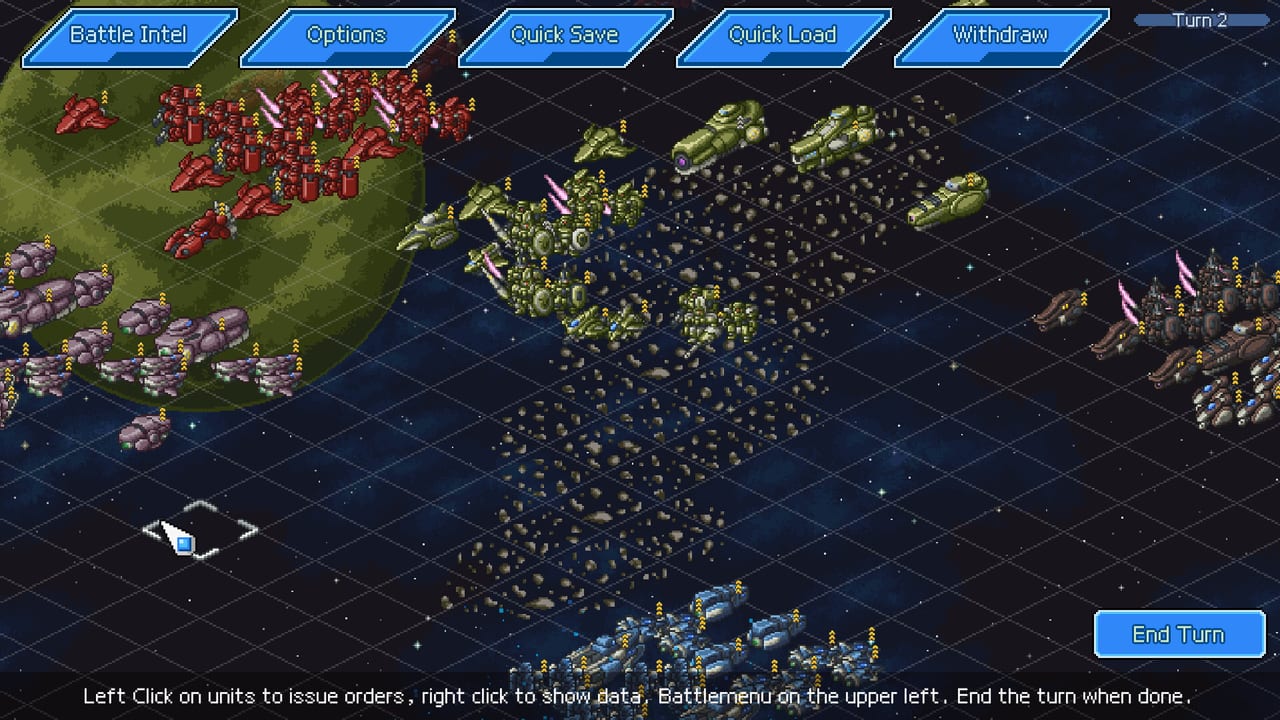
Chaos Front ships with full controller support, keyboard-only, mouse-only, and a Steam Deck Verified badge. The grid still assumes you can read a footer tooltip. This page is the input sheet for the launch build. Pair it with getting started and combat.
Tactical battle inputs
Store screenshots print the battle footer in plain English: left click units to issue orders, right click to show data, Battle menu on the upper left, End Turn when done. That mapping is the one to memorize.
- Left click — select a unit, pick a highlighted move tile, confirm an attack, ram, seize, or skill.
- Right click — open the data panel, cancel a half-chosen order, or back out of a submenu.
- Battle Intel / Options / Quick Save / Quick Load / Withdraw — top bar. Quick Save before a ram you have never practiced.
- End Turn — bottom right. Clicking empty space does not end the turn.
Sortie is not a separate keyboard key in the demo footage. You select the mothership after it moves, then choose Sortie from its command list. If nothing happens, you clicked the void instead of the hull. The beginner guide walks that click path.
Campaign map inputs
On the Centersea node map the footer changes: click sites to move, ESC expands the Manage menu. Wait is an explicit button that spends time. Do not confuse it with End Turn.
Proposal screens (the Shazhou support example in official shots) tell you to select a target planet or pick another proposal, then right-click to return. That right-click-to-back pattern is consistent in collections, unit lists, and ending galleries.
Controller and Deck
Steam lists full controller support and Xbox controllers. Deck is Verified, not Unknown. Expect the same logic: confirm on the south face button, cancel on the east, camera comfort options in the accessibility list. If a prompt still says “left click,” the UI is speaking mouse while the pad still works.
Accessibility flags on the store page include keyboard-only, mouse-only, touch-only, save anytime, playable at your own pace, and no timed input. This is not a rhythm game. You can think.
Camera, speed, and combat animations
Developer logs added an option to watch allied unit combat animations. Turn them off when you are grinding repeatable campaign battles, on when you bought the game for Super Robot Wars fireworks. There is no competitive ladder that punishes you for watching a beam saber.
If text auto-advance feels sticky, that is a demo complaint from early footage. Look in Options for message speed before you assume the build is frozen.
Recommended bindings mentally
You cannot print a full custom-bind table from public docs, so do not memorize fan-made F-key lists. Remember jobs:
- Inspect before you move (right click / cancel).
- Move mothership, then Sortie.
- Quick Save before ram chains.
- End Turn only after morale and EN look sane.
- ESC on the galaxy map for Manage, shops, and recruitment.
When a fight is about loadouts instead of buttons, leave this page and open army builds. When a fight is about a dated story ping, open missions.
Common “broken controls” reports
Most “I cannot deploy” reports are Sortie, not a missing hotkey. Most “I cannot end the turn” reports are clicking the grid instead of the End Turn chip. Most “I cannot leave this menu” reports need a right click. If the game truly ignores the pad, check Steam Input on the Chaos Front page and the Deck compatibility overlay.
This wiki will not invent a key that Steam did not print. If Han Zhiyu posts a bind list in a future log, it will land on updates. Until then, trust the footer.
Frequently Asked Questions
Quick answers drawn from the launch build and official notes.
Does Chaos Front work on Steam Deck?
Yes. The store lists Steam Deck as Verified, with full controller support. Use the same Sortie-then-End-Turn habits as on mouse.
How do I deploy units from the battleship?
Move the ship, select it again, choose Sortie. See combat for what to do after they land.
Is there a pause?
It is turn-based with save-anytime. Quick Save sits on the battle top bar. There is no real-time twitch layer.
Can I play keyboard-only?
Steam lists a keyboard-only option and a mouse-only option. Pick one comfort mode in the accessibility set rather than fighting both at once.